
Tools
Every tool an AI agent can use on your store, the permission level each one needs, and how to switch a tool off for all agents.
An agent does its work through tools: small, named actions such as List products or Generate descriptions. The Tools tab of AI Product Tools > AI Agents lists all of them, says what each one does, and lets you switch any tool off for every agent.
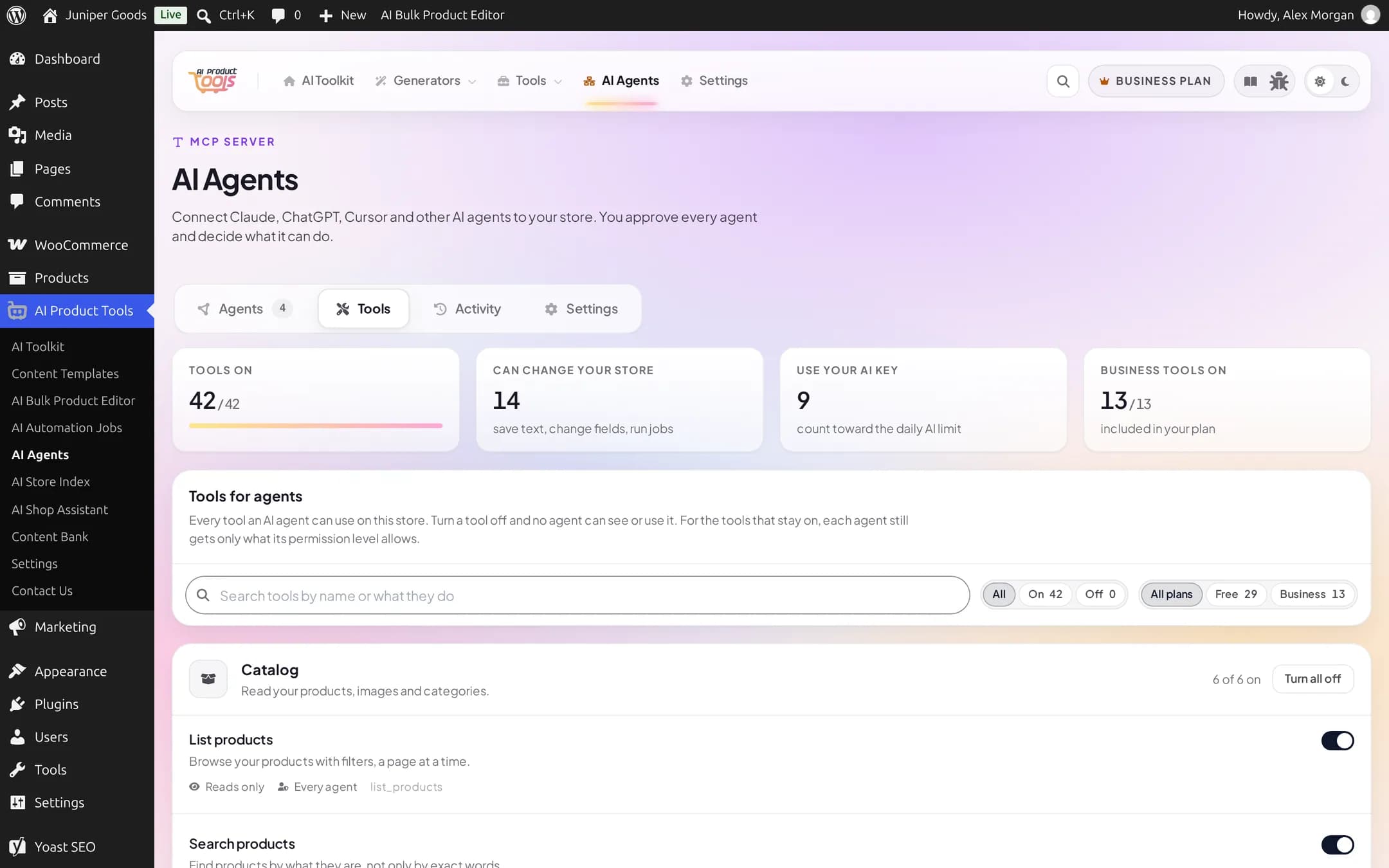
Reading the Tools tab
The tiles at the top count the tools that are on, the ones that can change your store, the ones that use your AI key (and so count toward the daily AI limit), and the Business tools on your plan. Below them, search by name or by what a tool does, and filter by On or Off and by plan.
Each row shows the tool's name and what it does, then:
- What it does to your store: Reads only, Works on drafts only, Changes store data, or Starts background jobs.
- Uses your AI key, when the tool calls your AI provider.
- Which agents can use it: every agent, or only Content editor and Store editor agents, and so on.
- The tool's technical name, for example
generate_description, which is the name agents see.

Switch a tool off
Turn a tool's switch off and no agent can see or use it, whatever its level. Each group also has Turn all off. A switched-off tool cannot be brought back for one agent through its tool list either. Every tool starts on.
Switching a tool off is store-wide. To narrow one agent instead, use its tool list under Manage agents Business.
On Free, Business tools are listed with a Business badge and no switch, so you can see what Business adds. Agents on a Free store do not see them.

All tools
The Level column is the lowest permission level that can use the tool. Tools marked AI use your AI provider key and count toward the daily AI limit.
Catalog
Read your products, images and categories.
| Tool | Name | Level | Plan |
|---|---|---|---|
| List products: browse your products with filters, a page at a time. | list_products | Read only | Free |
| Search products: find products by what they are, not only by exact words. | search_products | Read only | Free |
| Read a product: its text, SEO, images, categories, tags, price, SKU and status. | get_product | Read only | Free |
| See product images: up to five of a product's images, for example to write alt text. | get_product_images | Read only | Free |
| List categories: browse your product categories. | list_categories | Read only | Free |
| Find content gaps: count the products missing each kind of content. Uses no AI. | audit_catalog_content | Read only | Free |
Content
Write, check and save product content.
| Tool | Name | Level | Plan |
|---|---|---|---|
| Generate descriptions (AI): nothing is saved until it is applied. | generate_description | Content editor | Free |
| Generate titles (AI) | generate_title | Content editor | Free |
| Generate tags (AI) | generate_tags | Content editor | Free |
| Generate SEO meta (AI): an SEO title and meta description. | generate_seo_meta | Content editor | Free |
| Generate FAQs (AI) | generate_faq | Content editor | Free |
| Generate image alt text (AI) | generate_alt_text | Content editor | Free |
| Read the content brief: the content template and rules for a product, so the agent can write the text itself. | get_content_brief | Content editor | Free |
| Check a draft: check text the agent wrote against your template's limits and banned phrases. Uses no AI. | validate_content_draft | Content editor | Free |
| Save written text: save text the agent wrote to one field of a product. | apply_generated_content | Content editor | Free |
| Save a generated result: save text generated earlier to the product. | apply_content_result | Content editor | Free |
| Preview a template run: show which products a content template run would change, before anything happens. | preview_content_run | Content editor | Free |
| Run a content template (AI): run a previewed run, or start a job for a long list. | confirm_content_run | Content editor | Free |
| Read content briefs in bulk: for up to 20 products at once. | get_content_briefs | Content editor | Business |
| Check drafts in bulk: up to 20 drafts. Uses no AI. | validate_content_drafts | Content editor | Business |
| Save results in bulk: up to 20 checked drafts, to the products or to the review queue. | apply_content_results | Content editor | Business |
Product fields
Change prices, SKUs, status, categories and URL slugs. Changes are always previewed first, and the old values are kept as a version.
| Tool | Name | Level | Plan |
|---|---|---|---|
| Preview field changes | preview_product_field_change | Store editor | Free |
| Save field changes | confirm_product_field_change | Store editor | Free |
Automation jobs
Start, follow and control background jobs. See Automation.
| Tool | Name | Level | Plan |
|---|---|---|---|
| Check a job | get_job_status | Content editor | Free |
| List jobs | list_jobs | Content editor | Free |
| Pause, resume or stop a job | control_job | Content editor | Free |
| Start a bulk job (AI): a background job that writes content for a list of products. | start_bulk_content_job | Content editor | Business |
| Schedule a recurring job (AI): runs every day, week or month. | schedule_recurring_job | Content editor | Business |
Review and history
Work with the review queue, earlier versions and agent activity. See Content Bank.
| Tool | Name | Level | Plan |
|---|---|---|---|
| List the review queue | list_review_queue | Content editor | Free |
| Compare a review item with what the product shows now | get_review_item | Content editor | Free |
| Read content history: the saved versions of a product's content. | get_content_history | Content editor | Free |
| Read a field's versions, including the original | get_product_snapshot_stack | Content editor | Free |
| Check usage: today's AI generations, the agent's rate limit and how many agents are connected. | get_mcp_usage | Read only | Free |
| Read agent activity: recent requests made by AI agents. | get_mcp_activity_log | Read only | Free |
| Send to review: put generated content in the review queue instead of saving it. | queue_for_review | Content editor | Business |
| Edit a review item | edit_review_item | Content editor | Business |
| Approve a review item | approve_review_item | Content editor | Business |
| Reject a review item | reject_review_item | Content editor | Business |
| Approve review items in bulk: up to 100 at once. | bulk_approve_review_items | Content editor | Business |
| Reject review items in bulk: up to 100 at once. | bulk_reject_review_items | Content editor | Business |
| Restore a version of a product field. The current value is kept as a version first. | restore_snapshot | Store editor | Business |
| Export agent activity as a CSV file | export_mcp_activity_log | Read only | Business |
Generate, or write it yourself
An agent can create content in two ways:
- Generate: the
generate_*tools ask your AI provider, using your key and your content templates. These count toward the daily AI limit. - Write: the agent reads the content brief, writes the text itself with its own model, checks it with Check a draft, and saves it. This uses no AI calls on your side, and works even with the daily AI limit at 0.
Either way, nothing reaches the product until the agent saves (applies) it, and every saved change keeps a snapshot in the Content Bank.
One product or many
On Free, every content tool works on one product per request. Asking for several products at once is refused with a note that this needs Business, and the agent can repeat the request one product at a time. Business allows several products per request, bulk jobs, and the bulk briefs, drafts and results tools for up to 20 products at once.
Templates and prompts for agents
Besides tools, the server offers agents your content templates and brand voices to read, and two ready-made prompts some apps show as shortcuts: catalog audit and write in brand voice.